Camera & Creator / PRODUCT GUIDE
FIFINE AmpliGame AM8 guide: a close-talk USB mic that can move to XLR
The base-stand AM8 works directly with a computer over USB or with an audio interface over XLR. The connection matters: USB enables the on-mic controls and headphone monitor, while XLR hands those jobs to your interface.
As an Amazon Associate I earn from qualifying purchases.
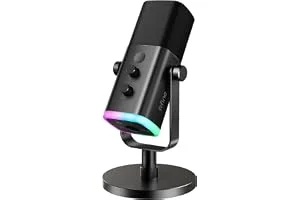
View FIFINE AmpliGame AM8 USB/XLR Dynamic Microphone for Gaming Streaming on Amazon (paid link) ↗
Start with the connection you need today
For a solo stream, screen recording, or remote interview, the AM8 can be the computer’s microphone without adding a mixer. FIFINE’s base AM8 package lists a desktop stand and USB cable. The AM8T and other arm bundles are separate offers, as is the AM8PLUS cable option. If you already record through an interface, budget for a separate XLR cable with the base kit and check that the plug has room under the microphone.
Aim the top of the mic at your mouth
The AM8 is a cardioid dynamic mic. The manufacturer manual suggests speaking from about two to six inches away. That is a useful starting point for a seated speaker because a nearby voice needs less gain than a distant one. Turn the mic slightly to one side if breath hits the windscreen on hard consonants. If you can only set it at the back of the desk, a stand that brings it closer will do more for this use case than the USB-to-XLR switch.
Use the two knobs for different jobs
Over USB, one knob changes mic gain while the other changes the headphones you plug into the mic. Start with a moderate headphone volume, then set gain while watching the level meter in your actual recording app. Raising what you hear in the headphones does not raise the recorded dialogue. Test the touch mute and check its indicator before a call. Someone who uses a keyboard shortcut to mute an application may also want to confirm which mute they activated.
Plan for a separate monitor path in XLR mode
On an XLR-only setup, set gain and monitor through the interface or mixer. FIFINE says the mic’s headphone monitoring, lighting and function controls are USB features. That matters for two-person podcast sessions: connect both mics to separate inputs and keep the interface’s headphone setup within reach. If your regular mute workflow depends on reaching for the AM8 itself, check how you will replace that control before moving to XLR.
A short stand can be the limiting accessory
The included base gets the microphone working on a desk. It may place the capsule below speaking height, particularly behind a laptop, and a desk shared with a keyboard can transmit bumps. Try putting the base beside the keyboard first. FIFINE specifies 3/8-inch and 5/8-inch mounting threads, so you can compare arm fittings using the hardware you already have. An arm also makes it easier to clear the mic from the camera frame after a recording.
Compare with Blue Yeti when you need different pickup modes
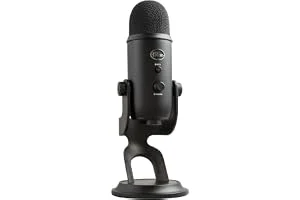
The Blue Yeti is a USB condenser with selectable pickup patterns. That flexibility is useful if the same desk sometimes hosts one speaker and sometimes hosts a conversation across the table. For one person in a consistent seated position, the AM8’s single cardioid pattern and close speaking distance are a simpler fit. The Yeti is the more direct comparison when XLR would never be part of your setup.
Compare with Shure SM58 for a handheld XLR workflow
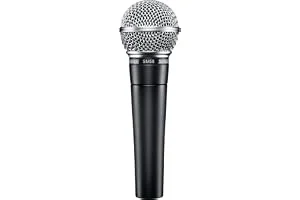
The SM58 is the stronger candidate for someone who already owns a suitable interface or PA and wants a handheld vocal mic. Consider the AM8 when you need a USB desk mic now and want the option to use an XLR interface later. If you do not expect to keep the microphone close, solve the placement problem first. This comparison uses manufacturer documentation and has no hands-on audio measurements or firsthand Ryan Rice endorsement.
Compare the shopping options
Blue Yeti — USB condenser with selectable pickup patterns
Shure SM58 — handheld cardioid dynamic microphone for XLR
Sources and review basis
Researched November 20, 2026. Ryan’s own experience is attributed where supplied. Other judgments are buying advice based on the cited product information, not a hands-on comparison or laboratory test. Prices and availability are checked at the retailer.