Toys, Games & Building Sets / PRODUCT GUIDE
LeapFrog Mr. Pencil Scribble, Write & Read guide: a stylus toy for short tracing sessions
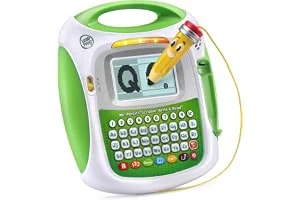
The green 80-617000 model gives ages three to five a guided tracing surface, word-sound activities and a way to practice a familiar name. Its strongest use is a brief stretch of stylus practice with an adult nearby.
As an Amazon Associate I earn from qualifying purchases.
View LeapFrog Mr. Pencil’s Scribble, Write & Read (Green) on Amazon (paid link) ↗
Match the words on the package
LeapFrog sells a similarly named Scribble & Write model. For this green 80-617000 version, look for Scribble, Write & Read and the colored strip under the display used for the word-sound activity. The maker lists the toy and a quick-start guide. Set aside three AA batteries if you are giving it as a gift and want to be able to use it that day.
Begin with a letter the child already recognizes
The stylus traces dotted shapes for uppercase letters, lowercase letters and numbers. The toy demonstrates stroke order and can animate a correctly traced character. Try the same familiar letter in both cases, then write it on paper together. The screen gives quick feedback while paper shows whether the movement transfers to a surface without guide marks. The product itself does not measure progress in handwriting.
Use personalization as a starting point
An adult can enter the child’s first, middle or last name. A first name alone gives them a familiar sequence to try. If several children share the toy, it may be simpler to start with its built-in letter activities so no one needs to change the setting between turns. The name feature makes most sense as another set of letters to trace.
The light bar changes the task from drawing to listening
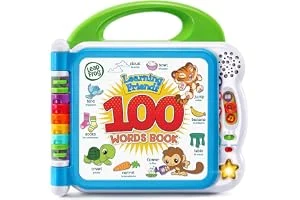
Moving the stylus beneath a word triggers the sound-it-out activity. Pause on a sound and let the child try to say what they hear. The toy is built around short prompts for letter sounds and simple words. For a child who mainly wants to hear a new word and recognize a picture, the separate 100 Words Book has a more immediate touch-and-listen format.
Let the number and drawing modes break up a long session
In the number activity, an animation can become a set of objects the child taps and counts. Dotted pictures and free drawing give the stylus another use when repeating letters gets frustrating. A compact writing surface is convenient for short sessions. It offers much less room than a sheet of paper for large marks, and precise input may be demanding for a child who is just beginning to hold a pencil.
Compare the 100 Words Book for English and Spanish vocabulary
The Learning Friends book offers illustrated, touch-activated vocabulary and a language switch. It makes more sense when the main goal is naming familiar objects together or hearing words in both languages. The Mr. Pencil unit fits when tracing, stroke order and early spelling are the reason for shopping.
Compare the LeapTop Touch for keys and pretend play
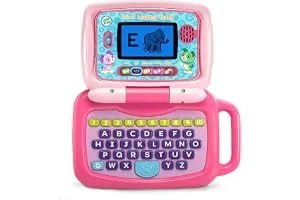
The pink LeapTop Touch converts from a keyboard layout into a touch-screen tablet format. Choose it if letters by key, songs and pretend computer play are more appealing. If the child wants to hold a stylus and practice forming a shape, Mr. Pencil gives them a clearer reason to pick up this model. The recommendations draw on published LeapFrog materials and do not claim firsthand testing or a learning outcome.
Compare the shopping options
LeapFrog Learning Friends 100 Words Book — touch-and-listen bilingual vocabulary
LeapFrog 2-in-1 LeapTop Touch — keyboard and touch-screen modes
Sources and review basis
Researched November 20, 2026. Ryan’s own experience is attributed where supplied. Other judgments are buying advice based on the cited product information, not a hands-on comparison or laboratory test. Prices and availability are checked at the retailer.