Computers, Tablets & Accessories / PRODUCT GUIDE
Lexar D40E 128GB flash drive guide: carry files between USB-A and USB-C
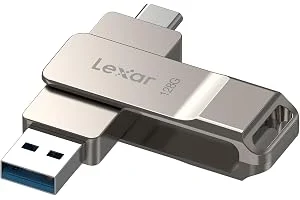
The Champagne Silver D40E has a rotating metal cover and two built-in connector types. It is useful for moving a project folder between a USB-C device and an older computer that still uses rectangular USB-A.
As an Amazon Associate I earn from qualifying purchases.
View Lexar D40E 128GB Dual USB 3.2 Gen 1 Type-C Jump Drive, Champagne Silver on Amazon (paid link) ↗
Rotate the cover to use one connector at a time
Select the connector that matches the device you are using. The other end is part of the same removable drive. Move the drive after ejecting it from the first host, then connect it to the second. This can free you from carrying a small adapter for a mixed-device desk. The metal swivel may need room next to neighboring ports. Check the clearance around a thick phone case or a tightly spaced laptop hub.
Confirm that the second device can read external storage
A USB-C-shaped socket alone does not guarantee that a phone, tablet or camera accepts external drives. Check the device’s documentation for storage and filesystem compatibility. For example, if you need files to move between two desktop systems, make sure both recognize the existing filesystem before starting. Back up the drive before reformatting it. Try opening a small sample on both devices before carrying the only copy of an important set.
Keep the interface number separate from the transfer rate
The listing identifies USB 3.2 Gen 1 and read speeds up to 100 MB/s for the LJDD40E128G-BNSNG. The interface describes the connection standard, and the read figure describes peak transfer under suitable conditions. A copy to the stick, many small files and a slower host can all behave differently. Use the drive for a handoff or presentation. For repeated multi-gigabyte editing transfers, compare a portable SSD with separately documented writes.
Plan around the 128GB label
Usable capacity will be smaller than the printed number once the drive is formatted. Leave space for changes and keep a copy elsewhere before transporting it. A swivel design keeps the parts together in a pouch, but it leaves a single small object that is easy to misplace. Label it if you hand drives to clients or teammates. Ryan has not benchmarked this drive or tested it in a phone.
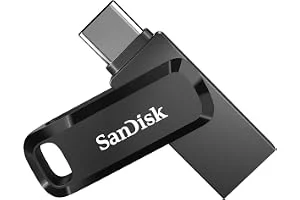
Compare SanDisk Ultra Dual Drive Go for a shorter two-port swivel
The 128GB Go also has USB-A and USB-C in one drive. Consider its smaller body if you leave the drive on a key ring or need less length around a laptop port. Compare the actual port clearance on your device. Both solve the same handoff problem, with different shapes and materials.
Compare Samsung BAR Plus when all your devices use USB-A
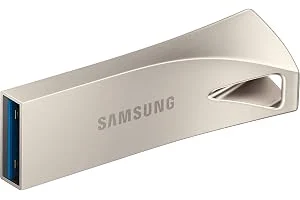
Samsung’s BAR Plus 128GB has a fixed USB-A connector and a metal housing. Choose it for fast, simple handoffs to computers that already have USB-A. The Lexar’s advantage is keeping USB-C on the same drive when you move between different ports.
Compare the shopping options
SanDisk Ultra Dual Drive Go 128GB — compact alternative with USB-A and USB-C
Samsung BAR Plus 128GB — fixed USB-A connector and metal body
Sources and review basis
Researched November 20, 2026. Ryan’s own experience is attributed where supplied. Other judgments are buying advice based on the cited product information, not a hands-on comparison or laboratory test. Prices and availability are checked at the retailer.