Computers, Tablets & Accessories / PRODUCT GUIDE
Samsung Type-C 256GB flash drive: fast reads in a tiny USB-C body, with slower writes
Samsung model MUF-256DA/AM is a 256GB USB-C flash drive rated for up to 400 MB/s sequential reads and up to 110 MB/s sequential writes under Samsung test conditions. It is a compact file-transfer tool for compatible computers, phones and tablets, but its single USB-C plug, small removable cap and flash-drive write behavior make it different from both a dual-connector stick and an external SSD.
As an Amazon Associate I earn from qualifying purchases.
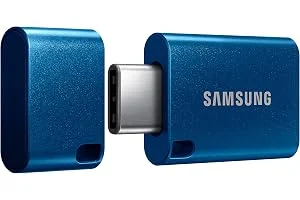
View Samsung Type-C USB Flash Drive 256GB, USB 3.2 Gen 1, Up to 400MB/s on Amazon (paid link) ↗
Confirm model MUF-256DA/AM and 256GB capacity
ASIN B09WB2NL8W identifies Samsung model MUF-256DA/AM, the blue 256GB Type-C drive. Samsung also sells 64GB, 128GB and 512GB versions with similar shells. The 256GB model is the one covered here; capacity affects the published performance table, so do not transfer the 64GB model’s lower rating or another generation’s specifications to this offer.
The 400 MB/s headline is a read ceiling
Samsung publishes up to 400 MB/s sequential reads for the 256GB drive. Its data sheet separately lists up to 110 MB/s sequential writes. Both figures come from Samsung internal testing, and the maker says host hardware and test conditions change real results. Expect copied files to write more slowly than they read, especially during long transfers, on older ports or after the drive becomes warm.
USB 3.2 Gen 1 describes the interface, not a guaranteed transfer
The drive complies with USB 3.2 Gen 1 and a bus speed up to 5Gbps, but the flash memory is not promised to fill that bus. Samsung lists backward compatibility with USB 3.0 and USB 2.0, where the host can impose a much lower ceiling. Use a known data-capable USB-C port and judge the drive by the published 256GB read-and-write table rather than the interface’s theoretical number.
USB-C shape does not guarantee every device can use storage
A compatible computer, phone or tablet must support USB mass storage and the drive’s file system. Some phones need an OTG setting, Files app permission or enough battery power; work-managed devices may block removable media. A USB-C charging port can also lack useful data support. Check the exact device documentation before relying on the drive for an on-location transfer.
Choose the file system around the devices and file sizes
A drive formatted as exFAT is often practical for sharing large files between current Windows and macOS systems, while a device may require FAT32 or another format. FAT32 cannot hold one file larger than 4GB. Reformatting erases the drive, so copy anything important elsewhere first and verify the destination device’s supported file systems rather than changing formats by trial and error.
Available space will be lower than the label
Samsung defines a gigabyte as one billion bytes and notes that operating systems, formatting and environment affect reported usable capacity. That is normal for storage products. Leave free space for orderly transfers and do not plan a shoot or delivery around exactly 256GB of visible room. Confirm the completed files at the destination before deleting the originals.
The compact body is convenient and easy to misplace
Samsung lists dimensions of 57.9 by 18.3 by 7.3 millimeters and an approximate weight of 7.7 grams. The cap protects the connector when fitted, but it is a separate small part that can disappear in a bag or editing room. Use the integrated loop for a tether, keep the cap in a consistent place and avoid leaving the drive attached where a side impact can stress the port.
Five-proof language has specific laboratory boundaries
Samsung documents controlled tests for water, temperature, shock, magnets and X-rays, including salt-water immersion at one meter for 72 hours. Those conditions do not make the drive an indestructible backup or promise recovery after every accident. Dry a wet connector before use, avoid deliberate exposure and keep another copy of important media; a product warranty is not a data-recovery plan.
Use it as a transfer copy, not the only archive
A thumb drive is well suited to carrying exports, documents, installers or a temporary second copy. It can be lost, damaged, reformatted or removed during a write. Keep original camera cards until verified backups exist, eject the drive through the operating system when required and maintain at least one separate copy of irreplaceable files on another device or service.
Compare Samsung BAR Plus when the destination is USB-A
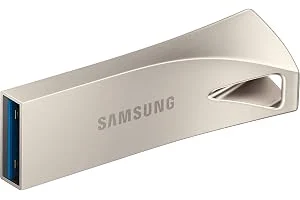
The cataloged Samsung BAR Plus 128GB uses a direct USB-A connector, a metal body and the same up-to-400-MB/s read headline for its capacity. It is a simpler match for older PCs, televisions and car systems with full-size USB-A ports. Choose the Type-C drive for modern USB-C devices and BAR Plus when the actual equipment has USB-A and no reliable adapter.
Compare SanDisk Dual Drive Go for two connector types
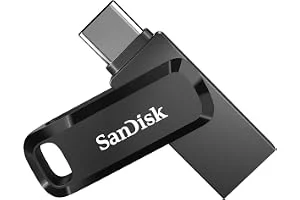
The cataloged SanDisk Ultra Dual Drive Go 128GB has both USB-C and USB-A connectors under a rotating cover. That makes it more flexible for moving files between a phone and an older computer without a separate adapter, although it has half the nominal capacity of this Samsung listing. Choose the dual drive for mixed-port handoffs and Samsung for the model-specific 256GB capacity and published 110-MB/s write ceiling.
The buying call
Choose MUF-256DA/AM when you want a small 256GB USB-C file shuttle and understand that the advertised 400 MB/s is a best-case read figure, not the write rate. Choose BAR Plus for USB-A equipment or Dual Drive Go when both plugs must travel together. Ryan has not claimed to own or test this exact drive; this guide uses Samsung and manufacturer documentation and does not invent sustained speeds, failure rates or compatibility results.
Compare the shopping options
Samsung BAR Plus 128GB — direct USB-A metal drive for older and full-size ports
SanDisk Ultra Dual Drive Go 128GB — rotating USB-C and USB-A connectors in one drive
Sources and review basis
Researched November 20, 2026. Ryan’s own experience is attributed where supplied. Other judgments are buying advice based on the cited product information, not a hands-on comparison or laboratory test. Prices and availability are checked at the retailer.
- Samsung U.S. exact MUF-256DA/AM product page
- Samsung official 2024 Type-C UFD data sheet: model lineup, 256GB speeds, dimensions and controlled resilience tests
- Amazon listing for Samsung Type-C 256GB, ASIN B09WB2NL8W (paid link)
- Samsung official BAR Plus 128GB product page
- Amazon listing for Samsung BAR Plus 128GB, ASIN B07BPK3XWW (paid link)
- SanDisk official Ultra Dual Drive Go data sheet
- Amazon listing for SanDisk Ultra Dual Drive Go 128GB, ASIN B07YYJRXQR (paid link)