Office & Organization / PRODUCT GUIDE
SUPVAN E11: quick keyboard labels with phone design when you need it
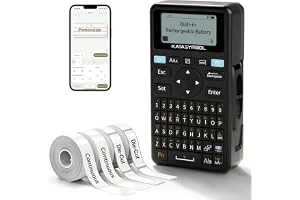
SUPVAN E11 B0DKS89T75 is the black label maker with four tape rolls. Its main reason to exist on a busy desk is the built-in keyboard: you can type a short label without first picking up a phone. Bluetooth app design adds flexibility, while the small tape format keeps the focus on identification and organization.
As an Amazon Associate I earn from qualifying purchases.
View SUPVAN E11 keyboard and Bluetooth label maker on Amazon (paid link) ↗
Buy the four-tape selection, not an assumed case bundle
The exact-ASIN supplier record lists two white continuous rolls measuring 15 mm by 6 m and two white die-cut rolls with 12-by-40-mm labels, plus a USB-C cable and manual. SUPVAN also sells a separately described four-tape bundle with a storage case. Its official page is useful for understanding the E11, but the extra case should not be assumed to come with this Amazon selection. Match the selected pack contents before ordering. The product image here shows the black keyboard unit and tape rolls; the pictured phone illustrates connectivity and is not an included accessory.
Use the keyboard for short decisions made at the shelf
A practical use is naming a newly created drawer or equipment bin as you sort it. Type a concise name, check it on the backlit display, and print a sample. The advantage is keeping that small task self-contained when a phone is charging elsewhere or already occupied. The tradeoff is the physical keyboard’s small size and the effort of entering a long list one item at a time. Ryan has not tested key feel or typing speed. If your project starts with dozens of names already in a document, consider the app workflow before manually retyping everything.
Choose continuous or die-cut stock before laying out the text
The included continuous rolls let you choose a label length appropriate to the wording, whereas the die-cut labels provide a fixed rectangle. That makes continuous stock a useful starting point for mixed-length names and die-cut stock useful when a row of labels should look consistent. Neither removes the need to fit the text within a narrow strip. Measure the flat area on the object, shorten the wording where possible and check one printed label at normal reading distance. For a shared gear shelf, consistent names such as CHARGERS and AUDIO ADAPTERS usually matter more than decorative formatting.
Treat app features and consumables as part of the purchase
SUPVAN documents optional Bluetooth app editing and a rechargeable battery for the E11. App designs are useful when you want a repeated style; keyboard entry remains the simpler path for a one-off name. Thermal printing avoids a separate ink cartridge, but compatible label rolls remain an ongoing supply. Check refill format and current availability before buying several printers for a team. This guide does not promise a battery runtime, universal phone compatibility or that every refill has the same adhesive performance. For labels exposed to washing, heat or abrasion, choose stock with documented suitability for that particular use.
Compare Phomemo D30 if phone-first design already suits you
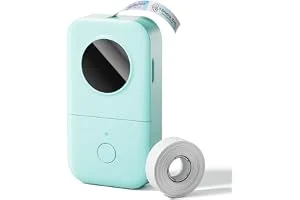
The Phomemo D30 B08HV3MPFD is a Bluetooth thermal labeler without the E11’s text-entry keyboard. Phomemo’s manual specifies a 12-mm effective print width and support for Android and iOS, with the Print Master app used in its setup instructions. It is worth comparing if you prefer designing all labels on a phone and do not need a second way to enter text. That preference is the meaningful difference: the E11 can be more convenient for an unplanned single label, while the D30 suits a workflow already centered on the app. Verify the selected D30 tape bundle separately.
Compare Avery 8160 when you really need address labels
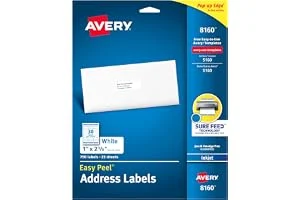
Avery 8160 provides 750 matte-white paper labels, each 1 by 2-5/8 inches, arranged thirty per sheet for inkjet printing. This is a different approach for mailing lists or a substantial batch of multi-line labels using an existing printer. You get a larger fixed rectangle and a page template, but must set up the sheet and printer correctly. The E11 is more convenient for producing a few small identification labels beside the items being organized. Choose the job format first: brief names at the shelf favor a portable labeler; full address batches favor a suitable sheet-label workflow.
Compare the shopping options
Phomemo D30 — phone-based design without a text-entry keyboard
Avery 8160 — inkjet address-label sheets for larger batches
Sources and review basis
Researched November 22, 2026. Ryan’s own experience is attributed where supplied. Other judgments are buying advice based on the cited product information, not a hands-on comparison or laboratory test. Prices and availability are checked at the retailer.