Office & Organization / PRODUCT GUIDE
TI-30XIIS: a two-line calculator for checking the expression as well as the answer
The TI-30XIIS, cataloged here as the black-and-blue B00000JBNX, is a scientific calculator for working through calculations by hand. Its strongest reason to buy is a familiar, relatively focused layout with the entered expression visible above the result. Choose it around the work your class requires, especially if a teacher demonstrates this exact model.
As an Amazon Associate I earn from qualifying purchases.

View Texas Instruments TI-30XIIS scientific calculator (Black) on Amazon (paid link) ↗
Two lines make corrections easier to follow
The upper line shows the entry while the lower line shows the answer. Previous entries can be recalled and edited, which is useful when a calculation is correct except for one number. For example, when comparing two measurements with the same formula, change the measurement instead of rebuilding the whole expression. That can also make checking a misplaced parenthesis less frustrating. The limitation is viewing space: two lines do not provide the longer visible history or textbook-style layout of the MultiView alternatives below. Write out the method on paper when the sequence of steps matters.
Fractions and angle settings deserve a little practice
TI lists fraction and mixed-number work, fraction-to-decimal conversion, trigonometric functions and degree, radian and grad modes. For a learner, the useful question is how comfortably they can enter the notation their worksheet uses. Practice a simple fraction calculation and an angle calculation with known answers before using it for an assignment. A calculator can evaluate a correctly entered expression without showing why the expression was appropriate. Keep units and intermediate reasoning alongside the result rather than treating the display as the complete solution. This is particularly useful when switching between a geometry exercise and work involving radians.
Statistics support does not replace organizing the data
The TI-30XIIS supports one- and two-variable statistics and five variable memories, and TI documents retained entries and memory as advantages over the simpler TI-30Xa. That makes it a candidate for a course involving a small set of measurements or paired observations. Prepare the data clearly on paper first, and verify what each column represents before entering pairs. If an exercise is mostly about examining a large dataset, manually entering everything may be the slow part regardless of the calculator’s functions. Check the course’s required workflow before assuming that a scientific calculator is the right tool for every statistics assignment.
Check the rear panel before planning a battery replacement
TI says this model uses solar power in bright light and a CR2025 battery when light is low. Its support article also distinguishes hardware revisions: units made after 2025 may have a battery door near the top of the back, while older versions lack that door. Do not assume the listing photo establishes which revision a seller will ship. TI warns that opening the full back case on the older design voids its one-year limited warranty. This is a reason to inspect the actual unit and use the matching support instructions, not to pry open every TI-30XIIS the same way.
Compare TI-30XS MultiView for easier expression reading
The TI-30XS MultiView provides a four-line display and MathPrint notation, including stacked fractions, plus an x/y table. It is the more relevant alternative when the main frustration is reading a fraction-heavy expression or seeing several steps together. Consider a student copying an expression from a textbook: a more similar visual layout can make checking that entry more straightforward, although it does not eliminate input errors. Both models use solar and battery power. Choose the TI-30XIIS if its workflow matches instruction you already receive; compare the MultiView when display layout is the specific improvement you want.
Compare TI-36X Pro when the syllabus needs more functions
The TI-36X Pro adds numerical equation, polynomial and linear-system solvers, numerical derivative and integral functions, and matrix and vector calculations. Those are meaningful differences for a course that actually uses them, rather than a reason every student needs the more capable model. It also has a four-line display. Read the syllabus and current calculator rules before buying either alternative; this guide makes no blanket exam-approval claim. Ryan has not tested these calculators or compared button feel, display visibility or battery life. For ordinary scientific calculations with teacher support for this layout, the TI-30XIIS remains a practical candidate; for solver-heavy work, investigate the Pro first.
Compare the shopping options
TI-30XS MultiView — four lines and textbook-style fractions
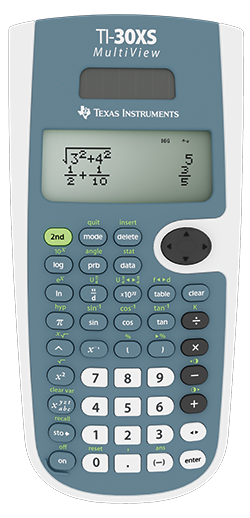
Product photo: Texas Instruments product photo
TI-36X Pro — solvers, matrices and numerical calculus
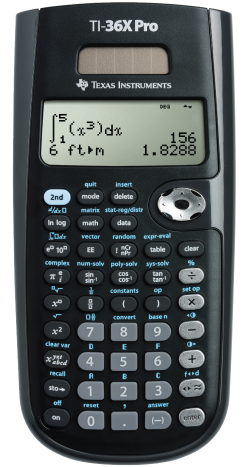
Product photo: Texas Instruments product photo
Sources and review basis
Researched November 21, 2026. Ryan’s own experience is attributed where supplied. Other judgments are buying advice based on the cited product information, not a hands-on comparison or laboratory test. Prices and availability are checked at the retailer.
- Texas Instruments official TI-30XIIS functions and display
- TI support: TI-30XIIS memory and statistics versus TI-30Xa
- TI support: power source, CR2025 and battery-door revisions
- Texas Instruments official TI-30XS MultiView alternative
- Texas Instruments official TI-36X Pro alternative
- Exact black TI-30XIIS B00000JBNX catalog identity
- Product photo: TI-30XS MultiView — four lines and textbook-style fractions
- Product photo: TI-36X Pro — solvers, matrices and numerical calculus